
    class Program
    {
        static void Main(string[] args)
        {
            Console.WriteLine($"Hello World! Main Thread:  {Thread.CurrentThread.ManagedThreadId }");
            AnotherMethod();
            Console.WriteLine($"Finish AnotherMethod():  {Thread.CurrentThread.ManagedThreadId }");
           // Console.Read();
        }

        static async void AnotherMethod()
        {
            await Task.Delay(2000);
            Console.WriteLine($"async await complete {Thread.CurrentThread.ManagedThreadId }");
        }
    }
結果: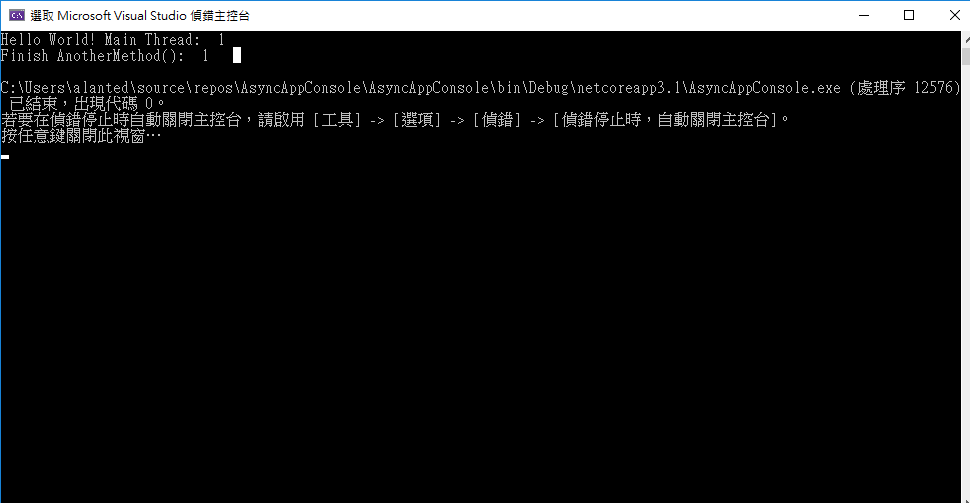
執行不到這行:
Console.WriteLine($"async await complete {Thread.CurrentThread.ManagedThreadId }");
按F11 逐行執行, 大概是因為 await Task.Delay(2000); 時 ,程式又回到
static void Main(string[] args) 裡面 , 所以印完Finish AnotherMethod() ,程式就結束了。
所以如果多加Console.Read();,因為程式還沒結束 , 所以就可以印出:
Console.WriteLine($"async await complete {Thread.CurrentThread.ManagedThreadId }");
結果: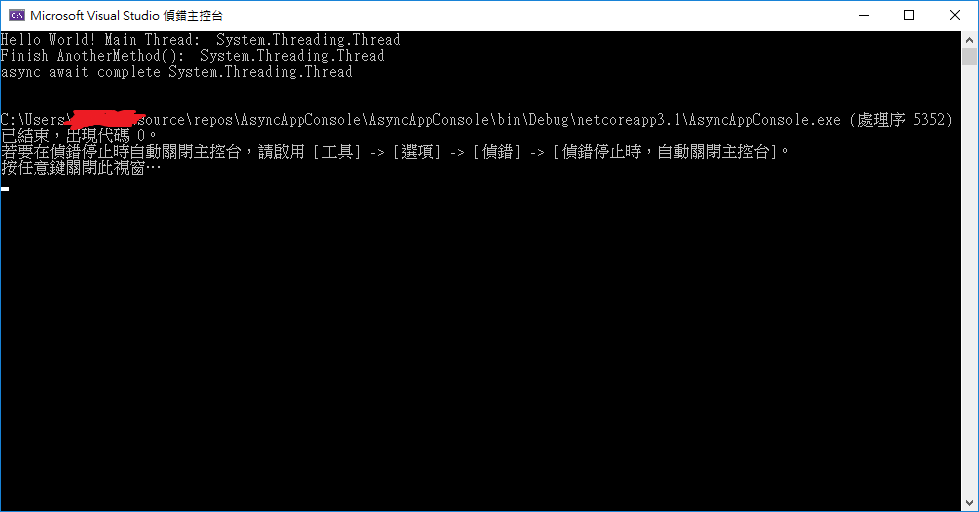
然後按F11 逐行執行,會發現用async、await ,系統還是會創建額外的執行緒(是因為await 這行 執行完後,為了要提醒 我完成了, 所以開了一個Worker Thread ? 但是這是非常輕量的thread ?)(async await的thread):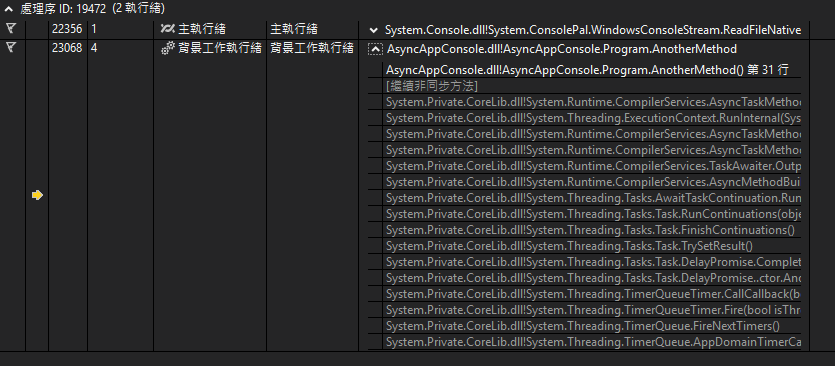
自己創建一個Thread,會跟async、await系統創建的,不太一樣: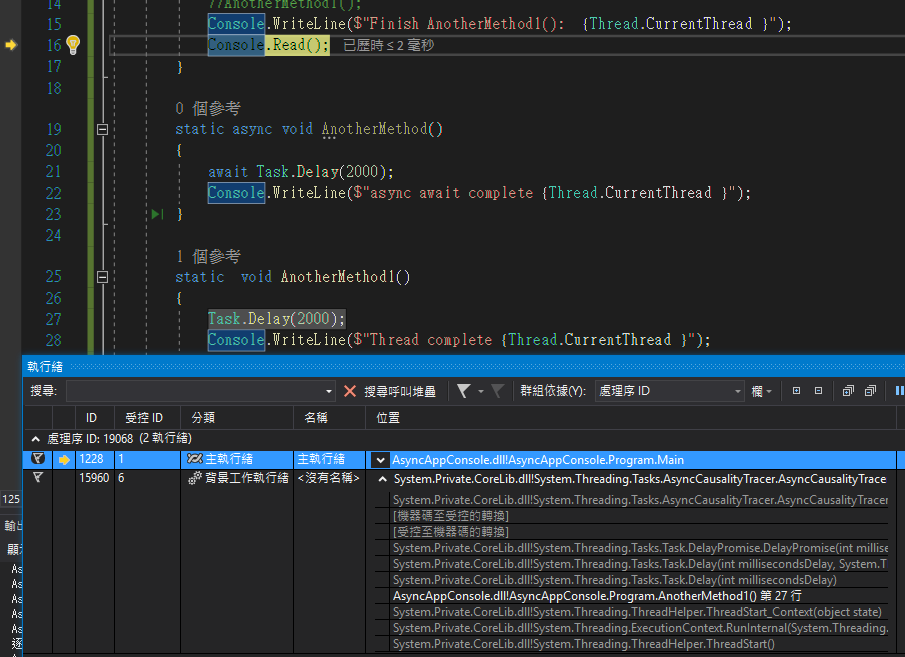
    class Program
    {
        static void Main(string[] args)
        {
            Console.WriteLine($"Hello World! Main Thread:  {Thread.CurrentThread.ManagedThreadId }");
            for (int i = 0; i < 5; i++)
           {
                Console.WriteLine($"i:  {i }");
                AnotherMethod();
            }
            Console.WriteLine($"Finish AnotherMethod():  {Thread.CurrentThread.ManagedThreadId }");
            Console.Read();
        }

        static async void AnotherMethod()
        {
            Console.WriteLine($"async await not complete {Thread.CurrentThread.ManagedThreadId }");
            await Task.Delay(20000);
            Console.WriteLine($"async await complete {Thread.CurrentThread.ManagedThreadId }");
        }
    }
這邊應該是真的有多條執行緒同步再跑嗎?,跟自己的電腦是幾核心有關係?,因為大概等20秒左右,五個async await complete就全部跳出來了,所以這4、7、8、5、6是多核平行跑,還是單核多個執行緒?(猜測async await這種系統的應該是單核多個執行緒,自己開的應該是多核平行跑,還是要看cpu決定?)
結果:
Hello World! Main Thread:  1
i:  0
async await not complete 1
i:  1
async await not complete 1
i:  2
async await not complete 1
i:  3
async await not complete 1
i:  4
async await not complete 1
Finish AnotherMethod():  1
async await complete 4
async await complete 7
async await complete 8
async await complete 5
async await complete 6
    class Program
    {
        static void Main(string[] args)
        {
            Console.WriteLine($"Hello World! Main Thread:  {Thread.CurrentThread.ManagedThreadId }");
             for (int i = 0; i < 5; i++)
             {
                Console.WriteLine($"i:  {i }");
                Thread x = new Thread(AnotherMethod1);
                 x.Start();
             }
            Console.WriteLine($"Finish AnotherMethod1():  {Thread.CurrentThread.ManagedThreadId }");
            Console.Read();
        }

        static void AnotherMethod1()
        {
            Console.WriteLine($"Thread not complete {Thread.CurrentThread.ManagedThreadId }");
            Task.Delay(2000);
            Console.WriteLine($"Thread complete {Thread.CurrentThread.ManagedThreadId }");
        }
    }
結果:
Hello World! Main Thread:  1
i:  0
i:  1
i:  2
i:  3
i:  4
Thread not complete 4
Thread not complete 6
Thread not complete 5
Finish AnotherMethod1():  1
Thread not complete 8
Thread not complete 9
Thread complete 4
Thread complete 6
Thread complete 5
Thread complete 8
Thread complete 9
參考:ASP.NET async 基本心法
看到:
.NET 實現非同步作業的做法是在需要等待時建立 SynchronizationContext,讓執行緒中斷作業先去處理其他作業,等待結束後再回頭繼續後半段。而繼續執行作業的執行緒可以是當初建立 SynchronizationContext 的那一條執行緒,也可以是其他執行緒。
換言之,若是一堆吃 CPU 的作業,增加執行緒肯定可以加速;若為要等待 I/O 回應的作業,增加執行緒用處不大,改為非同步作業才算對症下藥。
整理:
一 async await 是非同步作業,用來處理http的request、response,用的到
二 所以 > await Task.Delay(2000);
在await之後的程式 ,可能會新開執行緒,或是不開執行緒(根據 Task.Delay(2000) ,Task.Delay(2000)有開就會開新執行緒), 然後程式不會就在那邊等待 ,而是會跑回static void Main(string[] args),
完成後續的程式,在回到await之後的程式去跑
基本上對這塊一知半解,目前只會寫程式觀察執行順序,或是看看工作管理員。
找到教學,接著來練習:
新書發布: .NET 本事-非同步程式設計
程式來源:
async-book-support/Examples/Ch02/Ex10_Task/Program.cs
程式:
namespace ThreadTest03
{
    class Program
    {
        static void Main(string[] args)
        {
            for (int i = 0; i < 1000; i++)
            {
                Thread t1 = new Thread(MyTask);
                t1.Start();
            }
        }

        private static void MyTask()
        {
            Thread.Sleep(100000);
        }

    }

}
這樣寫好像真的會開1000個執行緒 , 到工作管理員的詳細資料 -->右鍵 選取欄位 -- > 增加
執行緒 -- >找到 ThreadTest03.exe ,發現有1010個執行緒 ,記憶體是 46184 K
然後可以在寫一個這樣的程式:
    class Program
    {
        static void Main(string[] args)
        {
            Console.ReadLine();
        }
    }
發現有10個執行緒,記憶體1856KB:
所以 1010 - 10 =1000 ; 46184 -1856 = 44328
所以真的有開1000個執行緒? , 然後 一個執行緒大概4430K ?(這樣的方法好像不是很正確)
不過很多教學都寫一條執行緒1MB,所以用這方法推論應該是錯的
然後參考:
[c#]執行緒(thread)和執行緒集區(threadpool)的使用
t1.Abort(); 可以關執行緒
t1.IsAlive 檢查執行緒是否還活著
但是關掉一個執行緒,也需要一點時間,所以關掉後馬上檢查是否還活著,會發現執行緒還活著:
    class Program
    {
        static void Main(string[] args)
        {
            for (int i = 0; i < 1000; i++)
             {
                 Thread t1 = new Thread(MyTask);
                 t1.Start();
                 //Thread.Sleep(5);
                 t1.Abort();
                if (t1.IsAlive)//判斷是否還活著
                {
                    Console.WriteLine("t1 Alive");
                }
            }
            Console.ReadLine();
        }

        private static void MyTask()
        {
            Thread.Sleep(100000);
        }

    }
結果一堆t1 Alive ,但是把Thread.Sleep(5);的註解拿掉 , 應該就少很多t1 Alive了
程式來源:
C# Async / Await - Make your app more responsive and faster with asynchronous programming
平行運算 (一):Parallel.For、Parallel.Foreach 用法及技巧
How can I tell when HttpClient has timed out?
How to correctly write Parallel.For with async methods
HTTP Get and Post request in C#.net
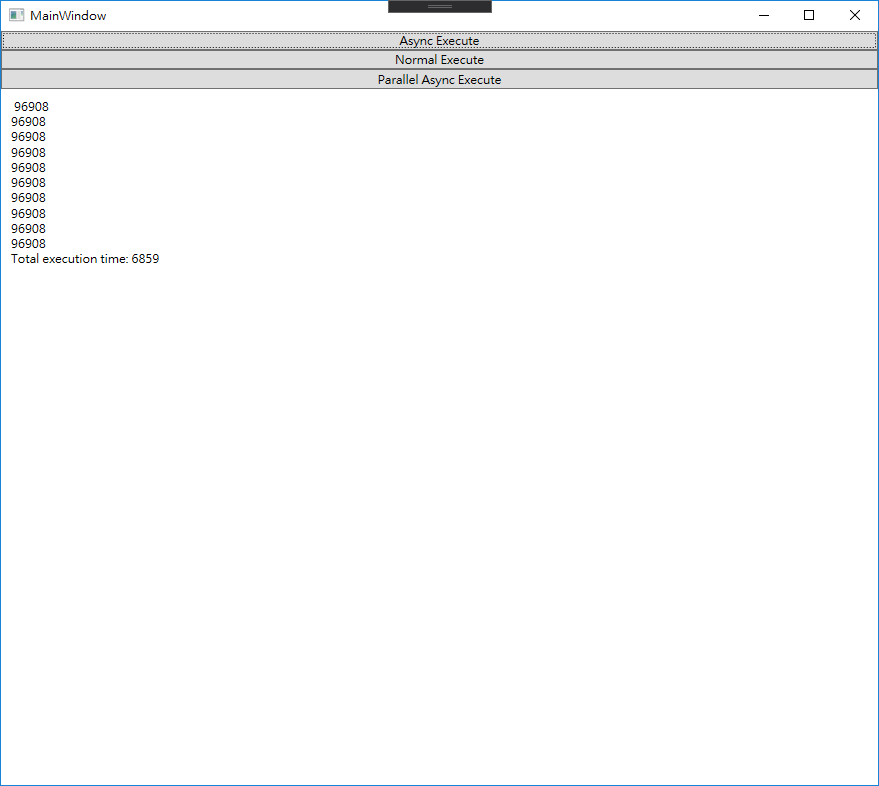
1 async await 按鈕,但是是一個request結束後,才執行另一個request,所以跟3比,比較慢
畫面:
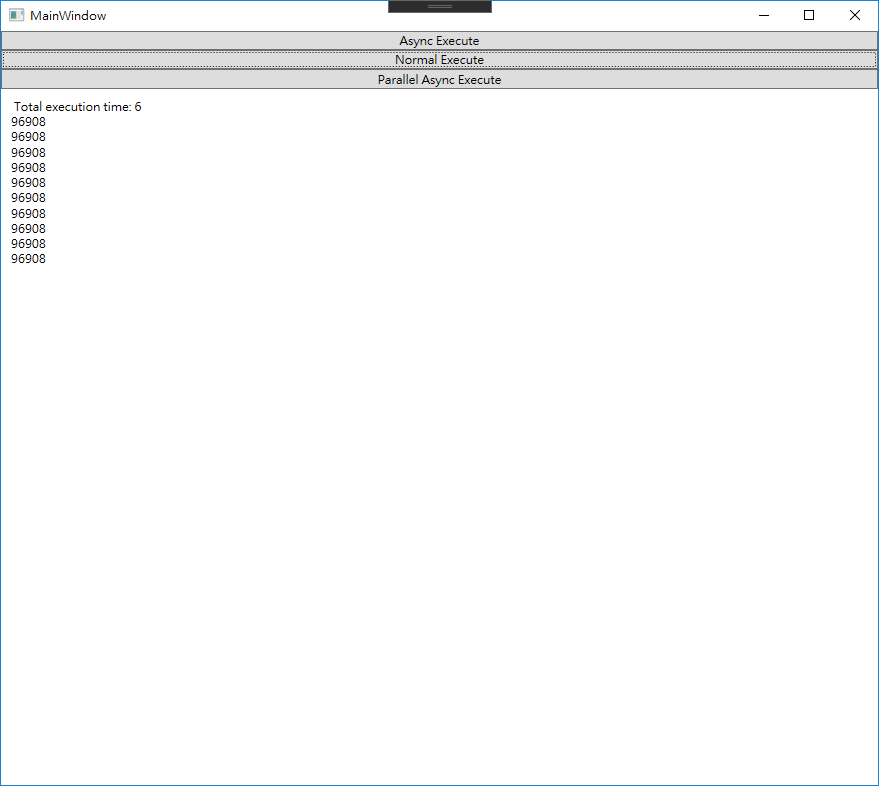
2 沒有async await 的按鈕 (時間先跑出來了)
畫面:
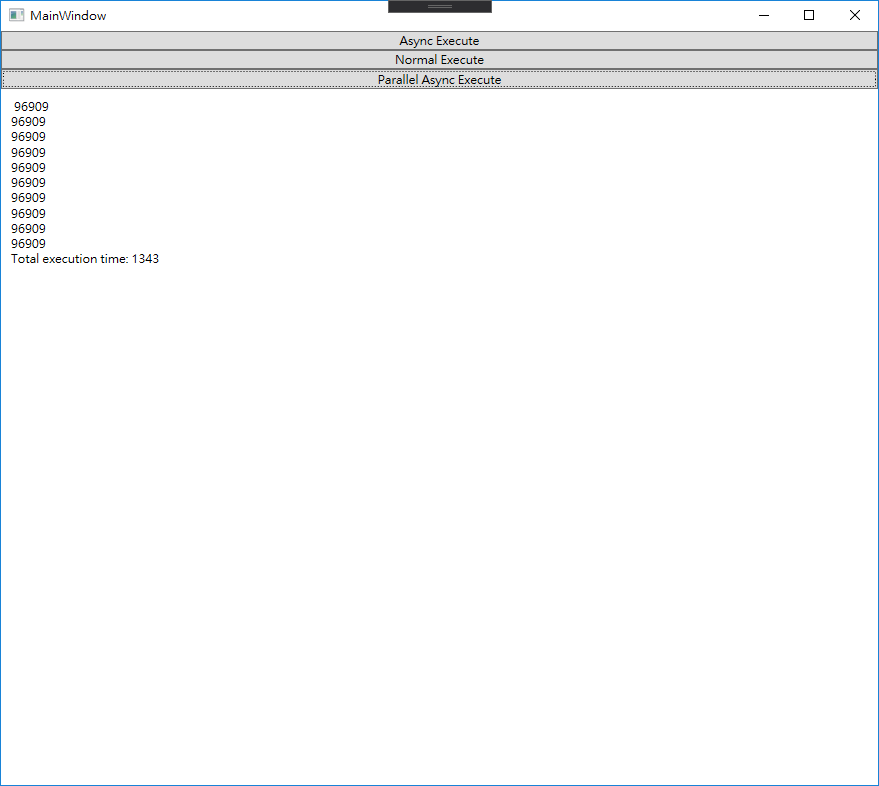
3 Task.WhenAll (看起來只是把很多個task聚在一起await,但是相比1速度快很多,因為1 是 一個request完成後,再 另一個 request,這個是 await 多個執行緒全部request完成。)
畫面:
程式:
MainWindow.xaml.cs:
<Window x:Class="EasyGet.MainWindow"
        xmlns="http://schemas.microsoft.com/winfx/2006/xaml/presentation"
        xmlns:x="http://schemas.microsoft.com/winfx/2006/xaml"
        xmlns:d="http://schemas.microsoft.com/expression/blend/2008"
        xmlns:mc="http://schemas.openxmlformats.org/markup-compatibility/2006"
        xmlns:local="clr-namespace:EasyGet"
        mc:Ignorable="d"
        Title="MainWindow"
        Height="450"
        Width="800">
    <Grid>
        <Grid.RowDefinitions>
            <RowDefinition Height="auto" />
            <RowDefinition Height="auto" />
            <RowDefinition Height="auto" />
            <RowDefinition Height="*" />
        </Grid.RowDefinitions>


        <Button Grid.Row="0"
                Click="get_Click01">Async Execute</Button>

        <Button Grid.Row="1"
                Click="get_Click02">Normal Execute</Button>

        <Button Grid.Row="2"
                Click="get_Click03">Parallel Async Execute</Button>

        <TextBlock x:Name="resultsWindow"
                   Grid.Row="3"
                   Margin="10" />
    </Grid>
</Window>
MainWindow.xaml:
using System;
using System.Collections.Generic;
using System.Net;
using System.Net.Http;
using System.Threading.Tasks;
using System.Windows;


namespace EasyGet
{
    /// <summary>
    /// Interaction logic for MainWindow.xaml
    /// </summary>
    public partial class MainWindow : Window
    {
        public MainWindow()
        {
            InitializeComponent();
        }

        //async
        private async void get_Click01(object sender, RoutedEventArgs e)
        {
            resultsWindow.Text = " ";
            var watch = System.Diagnostics.Stopwatch.StartNew();
            for (int i = 0; i < 10; i++)
            {
                await get_Http("https://ithelp.ithome.com.tw/");
            }
            watch.Stop();
            var elapsedMs = watch.ElapsedMilliseconds;
            resultsWindow.Text += $"Total execution time: { elapsedMs }" + Environment.NewLine;
        }

        //http async ,但是按鈕點擊沒有 async
        private void get_Click02(object sender, RoutedEventArgs e)
        {
            resultsWindow.Text = " ";
            var watch = System.Diagnostics.Stopwatch.StartNew();
            for (int i = 0; i < 10; i++)
            {
                get_Http("https://ithelp.ithome.com.tw/");
            }
            watch.Stop();
            var elapsedMs = watch.ElapsedMilliseconds;
            resultsWindow.Text += $"Total execution time: { elapsedMs }" + Environment.NewLine;
        }

        //async  全部http request
        private async void get_Click03(object sender, RoutedEventArgs e)
        {
            resultsWindow.Text = " ";
            var watch = System.Diagnostics.Stopwatch.StartNew();
            List<string> myLists = new List<string>(); //要request的資料
            for (int i = 0; i < 10; i++)
            {
                myLists.Add("https://ithelp.ithome.com.tw/");
            }

            List<Task> TaskLists = new List<Task>(); //task List
            foreach (string data in myLists)
            {
                TaskLists.Add(get_Http(data));
            }

            await Task.WhenAll(TaskLists);

            watch.Stop();
            var elapsedMs = watch.ElapsedMilliseconds;
            resultsWindow.Text += $"Total execution time: { elapsedMs }" + Environment.NewLine;
        }

        private async Task get_Http(String url)
        {
            using (HttpClient client = new HttpClient() { Timeout = TimeSpan.FromMilliseconds(3000) })
            {
                try
                {
                    using (HttpResponseMessage response = await client.GetAsync(url))
                    {
                        using (HttpContent content = response.Content)
                        {
                            string mycontent = await content.ReadAsStringAsync();
                            resultsWindow.Text += $"{ mycontent.Length }" + Environment.NewLine;
                        }
                    }
                }
                catch (WebException ex) //還不知道這是什麼
                {
                    resultsWindow.Text += $"WebException: { ex }" + Environment.NewLine;
                }
                catch (TaskCanceledException ex) //timeout事件
                {
                    resultsWindow.Text += $"TaskCanceledException: { ex }" + Environment.NewLine;
                }
            }
        }


    }
}
備註:
參考:What is TPL ( Task Parallel Library) and how it differs from threads (c# interview questions) ?
windows + R -- > perfmon (開啟效能監視器) -- > 右鍵新增計數器 -- >選擇CPU核心
-- >可以觀看每個CPU核心的執行狀況?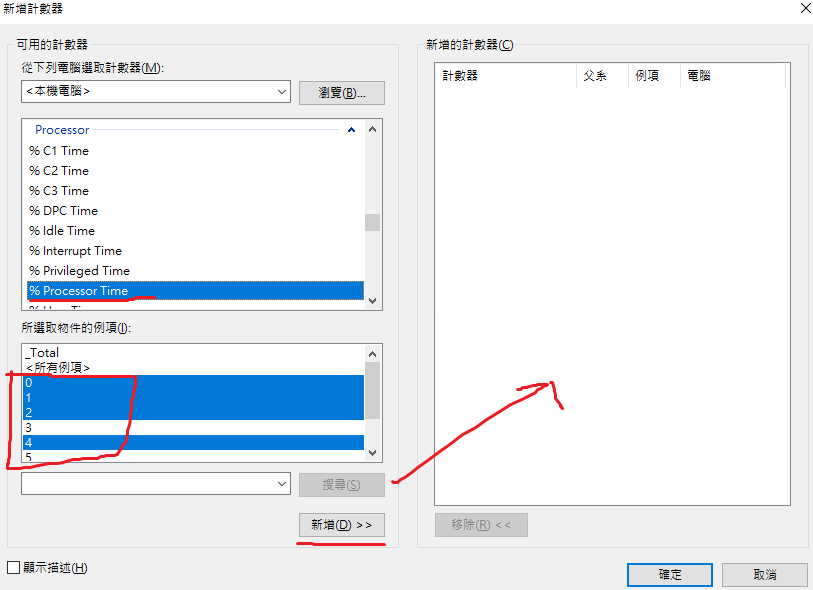
程式來源:C# Delegates explained
Delegates練習:
using System;

namespace DelegatesTest
{
    class Program
    {

        public delegate void TestMethodPtr();

        static void Main(string[] args)
        {
            Console.WriteLine("Hello World!");
            TestMethodPtr obj = new TestMethodPtr(TestMethod);
            obj.Invoke();

            TestClass obj1 = new TestClass();
            obj1.LongRunning(TestMethod1);
        }

        static void TestMethod()
        {
            Console.WriteLine("Hello TestMethod()");
        }

        static void TestMethod1(int i)
        {
            Console.WriteLine($"TestMethod1 {i}");
        }
    }

     class TestClass
    {
        internal delegate void CallBack(int i);
        internal void LongRunning(CallBack obj)
        {
            for (int i = 0; i < 1000; i++)
            {
                obj(i);
            }
        }
    }
}
iTextSharp是舊的,現在是itext7,不過不會用itext7,就用iTextSharp
參考資料:
iTextSharp
itextsharp/src/core/iTextSharp/text/pdf/parser/LocationTextExtractionStrategy.cs
[C#][iTextSharp] PDF 套版
Getting Coordinates of string using ITextExtractionStrategy and LocationTextExtractionStrategy in Itextsharp
[.NET,iTextSharp]用程式呼叫cmd(command line)執行exe(以開啟adobe reader列印pdf為例)
Search Particular Word in PDF using Itextsharp
ItextSharp can't find PDF
[.NET]iTextsharp找不到字型檔問題(.ttf not found as file or resource)
itext7:
itext7
itext7-dotnet
iTextSharp整理
1 座標以PDF左下為(0,0),x往右+,y往上+
2 LocationTextExtractionStrategy 可以取得特定文字的座標,這樣可以把PDF的字用白色,然後在上面自己在增加圖片或文字。
3
這段可以取得當前PDF頁數(像是第一頁)的所有文字,
currentPageText -->有所有文字的內容
ITextExtractionStrategy strategy = new SimpleTextExtractionStrategy();
string currentPageText = PdfTextExtractor.GetTextFromPage(pdfReader, page, strategy);
Possible to decompile DLL written in C?
[工具]反組譯的好工具-JustDecompile
[.NET] ILSpy 程式碼反組譯工具
ILSpy 6.0 Preview 2
C#_DLL反編譯功能_EXE(Application)和DLL(Application Extension)的差別在哪???_DLL的意義_反編譯目的
C# Parallel.For 的效果威力
What is TPL ( Task Parallel Library) and how it differs from threads (c# interview questions) ?
如何:撰寫簡單的 Parallel.For 迴圈
Developing Simple APDU Sender using WinSCard
C# SCardGetStatusChange() check smartcard status
python 讀取健保IC卡資訊
What APDU command gets card ID
[Java] Java讀取健保卡基本資料(晶片讀卡機)
[C#] C# 語取健保卡基本資料─晶片讀卡機
整理:
C:\Windows\System32\WinSCard.dll
SCardEstablishContext -- > SCardListReaders (找到所有讀卡機) -- > 用一個 List 把讀卡機的名稱都存起來 -- > 用List 裡的所有讀卡機的名稱 ,製作一個 SmartCardReaderState[] 的東西 -- >
SCardGetStatusChange 把 SmartCardReaderState[] 當參數帶入 --> 之後 跑 SmartCardReaderState[] 迴圈,一個一個檢查 卡片狀態 -- > 如果卡片狀態是Card Present 的 , 就用 SCardConnect 連接卡片
-- > 連接卡片成功的話,就可以SCardTransmit 送訊息給智慧卡 -- >SCardTransmit的 倒數第二個參數 ref byte pbRecvBuffer 就可以獲得 智慧卡給的資訊 -- >接著關閉連接卡片 SCardDisconnect -- >結束SCardReleaseContext
每個過程如果 回傳 的整數 != 0 ,就代表有錯誤
有兩種類別的APDU:命令APDU和響應APDU。
命令APDU由讀卡器發送到智慧卡-它包含了一個必選的4字節的頭部(CLA,INS,P1,P2)和0到255位元組的數據。
響應APDU由智慧卡發送到讀卡器-它包含了必選的2位元組的狀態字和0到256位元組的數據。
The SCardTransmit function sends an APDU command to the smart card and expects to receive APDU response from the card.
所以SCardTransmit應該就是 命令APDU 送訊息給智慧卡 ,智慧卡會在帶訊息回參數
這段程式的讀卡機型號好像是 EZ100PU
EZ100PU
不過測試是 這個也可以it-500u:
it-500u
判斷讀卡機的卡片狀態主要就是參考這段:
C# SCardGetStatusChange() check smartcard status
不過很多看不懂,大概只知道
readerState.eventState 去跟
public static readonly UInt32 Present = 0x00000020; //十進位就是32 // 二進位100000
public static readonly UInt32 Atrmatch = 0x00000040; // 十進位64 // 二進位1000000
用&運算,如果其中一個>0 ,就算 "有卡片在 讀卡機"
如果卡片晶片放錯邊,好像也算 "有卡片在 讀卡機"
不過卡片放錯邊,會在SCardConnect有錯誤 ,錯誤數字: -2146434970 ,不知道是不是數字都一樣
獲得的讀卡機字串長這樣,表示有兩個讀卡機:
Generic Smart Card Reader Interface 0 Generic Usb Smart Card Reader 0
然後結尾都是以0當結尾, 所以用0 split
裡面常看到in、out、ref:
C#雜記 — 參數修飾詞 in、out、ref
C# - Using in, out, and Ref with Parameters
整理
1 out 一定要new ,不然會有:
在程式控制權脫離目前的方法之前,必須指派 out 參數 'student'。
2
in的參數 ,則是 不能有new:
無法指派至 變數 'in Program.Student',因為它不是唯讀變數
沒辦法:
student = new Student();
但是可以
student.Enrolled = true;
因為
僅有物件本身(student)為唯獨,物件內的屬性(student.Enrolled )不受影響,因為是不同的參考位址
3
ref 就是 沒有限制
參考:
1
SCardListReaders 第一次呼叫時並不知道機器有幾台可用之讀卡機所以mszReaders先代入NULL,取得實際數量後再呼叫一次就可列出讀卡機名稱。
所以這部分這樣寫:
ErrorInt = SCardListReaders(ContextHandle, null, null, out bufferLength); //先取得長度
Debug.WriteLine($"bufferLength{bufferLength}"); //71
ReaderList = new byte[bufferLength];
ErrorInt = SCardListReaders(ContextHandle, null, ReaderList, out bufferLength);
常看到錯誤6
可能原因:
System Error Codes (0-499)
ERROR_INVALID_HANDLE
6 (0x6)
The handle is invalid.
Error 6 when connecting Gemalto smart card
可能錯誤原因:
Try to check your OS (32-bit or 64-bit) and your smart card driver (32-bit or 64-bit). Ensure that they are the same. Also, check that your codes are using the correct variable type.
一 smart card driver要跟作業系統一致32-bit or 64-bit
二 查看[DllImport("WinScard.dll")] 裡的變數有沒有什麼錯誤
三
還不了解:
Buyer Beware: Change Smart Card Admin Key PIN
Is it possible to update admin key by apdu command ?
Usually the admin key is protected with checksum, proprietary CLA and INS, or specific APDUs sequence. Please note that this depends on the vendor implementation which is RARELY shared.
四
WinScard SCardConnect returns SCARD_E_NOT_READY
SCardConnect 有個參數是 uint dwShareMode,設定的值有
// This application will NOT allow others to share the reader. (SCARD_SHARE_EXCLUSIVE)
Exclusive = 0x0001,
// This application will allow others to share the reader. (SCARD_SHARE_SHARED)
Shared = 0x0002,
// Direct control of the reader, even without a card. (SCARD_SHARE_DIRECT)
Direct = 0x0003
如果設定1 ,開兩個程式去讀 卡片 ,就會有錯誤 。 所以改成2
3的話好像也有錯誤-2146435061 。所以如果有兩個程式同時去跑讀卡,都設定2才不會有誤
五
SCardGetStatusChange 這邊如果是在netcoreapp3.1 ,也會有6 ,在.NETFramework,Version=v4.7.2不會
SCardEstablishContext 程式一開始執行一次
SCardReleaseContext 程式關掉前執行一次
想在WPF用個Circular Progressbar
一開始參考:
Circular Progressbar using C#
是在Windows Forms 畫的 , 會看起來閃閃的 , 所以不採用。
如何在WPF 使用Windows Forms 的東西?
一 增加System.Windows.Forms 、 WindowsFormsIntegration (加入參考,原本就有的東西,不用下載)
二 在 xaml增加
        <WindowsFormsHost x:Name="windowsFormsHost"
                          VerticalAlignment="Center"
                          Height="500"
                          Width="500"
                       >
            <WindowsFormsHost.Child>
                <wf:Panel x:Name="myPanel"
                          Paint="CircularProgressBar_Paint" />
            </WindowsFormsHost.Child>

        </WindowsFormsHost>
三 之後再CircularProgressBar_Paint 就可以畫圈圈了
後來找有沒有現成的套件:
C# Tutorial - Circle Progress Bar | FoxLearn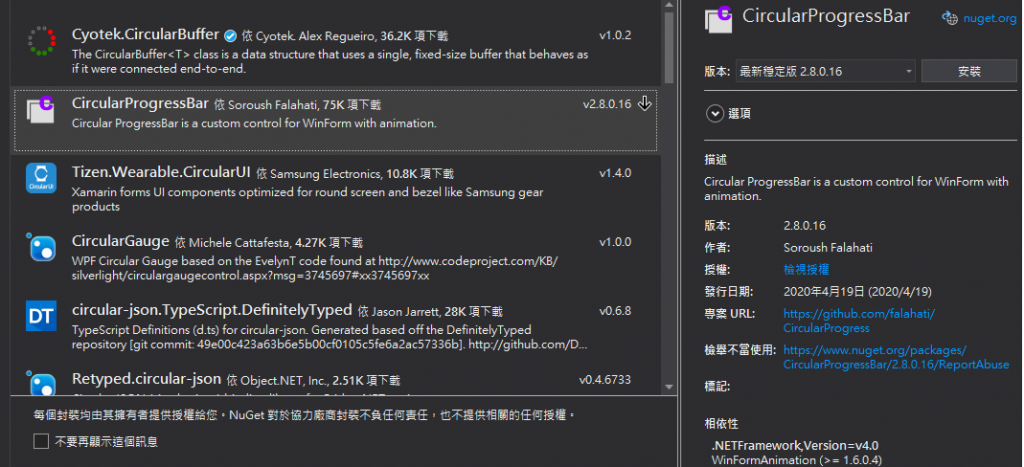
不過我不會在WPF使用,所以就放棄了
最後參考這個,完成的
How To Create A ProgressCircle In C# With WPF
步驟:
1
好像是要先下載這個東西(youtube有附連結):
Microsoft Expression Blend 4 Software Development Kit (SDK) for .NET 4
https://www.microsoft.com/zh-tw/download/confirmation.aspx?id=10801
然後下載的dll會在
C:\Program Files (x86)\Microsoft SDKs\Expression\Blend\.NETFramework\v4.0\Libraries\Microsoft.Expression.Drawing.dll
2
之後這邊作者有提供code,在youtube有附連結 , 只要加入Microsoft.Expression.Drawing.dll的參考,就可以跑程式了。
3
Cannot find invalidate method for MainWindow
invalidate -- Windows Forms
InvalidateVisual() -- WPF
先用InvalidateVisual()吧!還不知道RedrawWindow function是什麼
4
修改ProgressCircle 的 value 值 1 -100 ,就有轉圈圈的效果
[.NET]iTextsharp找不到字型檔問題(.ttf not found as file or resource)
【python內建模組- unitest】單元測試
Creating your first unit test


await 之後不一定會在新的執行緒
要看後面接的方法裡面有沒有另外開
比較好的說法是 Task.Delay(2000) 這個方法裡面會開新的執行緒

喔喔,了解,謝謝

 iThome鐵人賽
 看影片追技術